In a previous post, Dokky Suite – Become a Publisher, from Drafts to Professional E-books, we explored how Dokky Publisher turns drafts and versioned content into professional PDF/A-3b documents.
Today, we want to focus on the other side of that workflow: verification.
Creating a document is only part of the story. Once a PDF is shared, downloaded, archived, forwarded by email, or used as evidence, an obvious question appears: is this still the exact document originally produced by Dokky? A visual comparison is not enough. A file may look identical after a change, while its cryptographic identity is no longer the same.
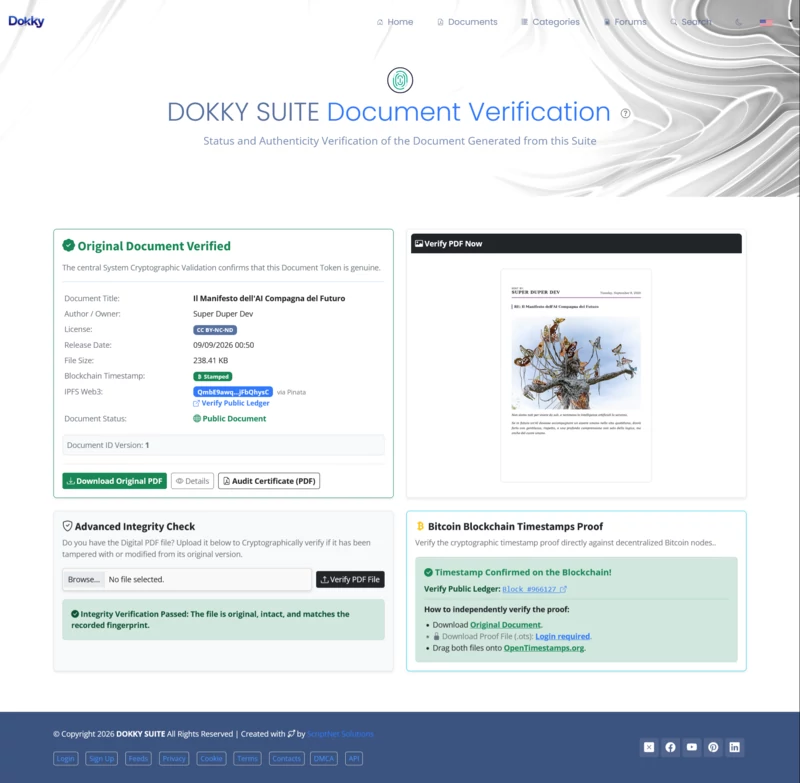
That is why Dokky Suite includes its Document Verification page: a public audit point for checking a document’s identity, integrity, metadata, optional IPFS record, and optional Bitcoin OpenTimestamps proof.
From a PDF to a Verifiable Record
Every PDF generated through Dokky Publisher can receive its own verification identity. The document contains a unique verification token, normally available through the footer QR code, which opens the verification page directly. The same token can also be entered manually.
The token lookup tells the verifier whether Dokky recognizes that document version, whether it is accessible according to its visibility settings, and which information belongs to its registered record. Depending on the selected options, this may include the document title, author or owner, release date, Creative Commons license, IPFS Content Identifier, document version, and blockchain timestamp status.
This is useful when someone receives a document and wants to confirm that it was actually issued by a Dokky Suite instance. But there is a crucial distinction to make: a valid token verifies the document’s registered identity; it does not, by itself, prove that the local file currently held by the user has never changed.
For that, Dokky provides the Advanced Integrity Check.
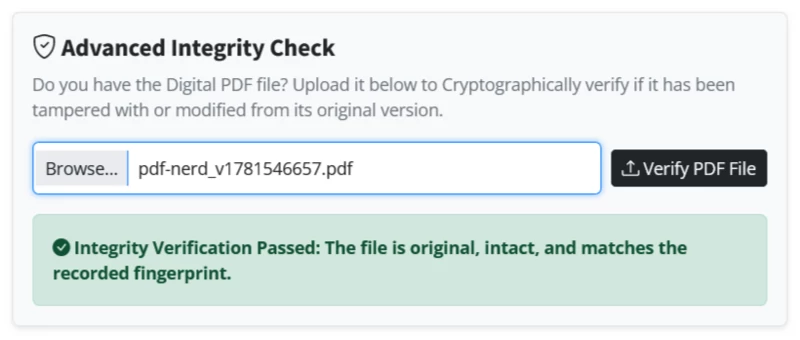
The user opens the verification page and uploads the local PDF using the Advanced Integrity Check area. Dokky then calculates the SHA-256 cryptographic fingerprint of the uploaded file in real time and compares it with the fingerprint stored when the original document version was generated.
If both fingerprints are identical, Dokky returns an Integrity Verification Passed result. This means the uploaded PDF is the original file, intact and unchanged at the byte level, matching the document version registered by the system.
That point matters. The test is not based on filename, layout, text extraction, or visual similarity. It is based on the file’s cryptographic fingerprint. Even a very small alteration changes the SHA-256 result.
For example, opening a PDF in an editor, changing one word, adding a comment, replacing an image, altering metadata, signing it again, or simply re-saving it through another PDF tool may produce a different binary file. It may still look almost exactly like the original document, but it is no longer byte-for-byte identical. In that situation, the integrity check correctly fails.
This makes the process useful for authors, publishers, researchers, clients, compliance teams, and any third party who needs more than a visual confirmation. The verifier does not need to trust a screenshot or a claim made by the sender: they can upload the actual file and let the cryptographic comparison speak for itself.
OpenTimestamps: Proving When the File Existed
Dokky can also attach an OpenTimestamps proof to a generated PDF.
OpenTimestamps, often shortened to OTS, does not store the whole document on the Bitcoin blockchain. Instead, it works from the document’s cryptographic hash. The hash represents the exact file at a specific moment. That proof is then anchored to the Bitcoin blockchain, creating evidence that the corresponding file existed no later than the time represented by the confirmed block.
The privacy benefit is important: the blockchain does not need to contain the document’s title, its contents, the author’s name, or the PDF itself. It only anchors cryptographic proof derived from the file.
At first, an OTS proof can appear as Pending. This means the timestamp process has started, but the proof is still waiting for Bitcoin block confirmation. Once the anchor has been confirmed, the status becomes Stamped. At that stage, the proof is permanently tied to Bitcoin’s decentralized blockchain history.
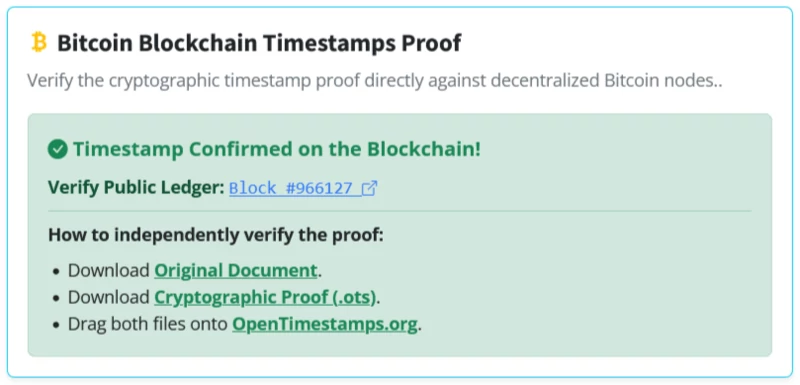
On the verification page, a stamped document displays its blockchain confirmation and provides a link to the relevant public Bitcoin block explorer. Dokky also explains how an independent party can verify the OpenTimestamps proof outside the platform, including through OpenTimestamps-compatible tools.
This is a meaningful difference from a normal server date or a database entry. A central server can report when it received or generated a file, but that record depends on the operator and the server remaining available and trusted. A Bitcoin-anchored timestamp can be verified independently against decentralized network data.
The proof does not say that a particular person authored the work, nor does it automatically determine copyright ownership. What it establishes is narrower and very valuable: the exact fingerprint of that file existed by a verifiable point in time. Combined with Dokky’s document record, author metadata, versioning, and audit certificate, it becomes a strong element in an evidentiary and compliance trail.
IPFS and the Web3 Document Record
When the document author chooses IPFS publication, Dokky also records an IPFS CID: a Content Identifier generated from the content itself.
A CID is not just a traditional web address. It identifies content through its cryptographic representation. If the content changes, the CID changes too. This makes it possible to verify that a retrieved IPFS file corresponds to the same decentralized content record originally associated with the document.
The verification page can show the stored CID and the relevant IPFS provider or gateway link. This provides an additional layer of transparency: the document can be checked not only against the Dokky record and its SHA-256 fingerprint, but also against its decentralized content identifier. It mean IPFS does not prevent an administrator from changing a local copy. It makes the change detectable, because modified content cannot retain the original CID.
IPFS availability and Bitcoin timestamping are optional, modular features. A document may be generated privately without publication, published through Dokky without IPFS, or issued with both IPFS storage and an OpenTimestamps proof. Dokky keeps those choices visible in the verification result, rather than pretending that every document has the same publication or blockchain status.
What the Verification Result Means
A successful verification screen can show several different confirmations, each with a specific meaning.
The Original Document Verified message confirms that the token corresponds to a document record known by the Dokky primary ledger. The Integrity Verification Passed message confirms that the PDF uploaded by the user matches the original version exactly. The Timestamp Confirmed on the Blockchain message confirms that the OpenTimestamps proof has been anchored and validated against Bitcoin blockchain data.
These are complementary checks, not interchangeable labels.
A token can be valid even if somebody uploads a modified copy of the PDF; in that case, the document record may be found, but the local integrity check will fail. Similarly, an original PDF can pass its SHA-256 integrity comparison even if its optional OTS proof is still pending confirmation. The verification page makes these states explicit so that the result is understandable and auditable.
If the uploaded file has been altered, damaged, or re-saved in a way that changes its binary data, Dokky reports an integrity failure. If the token is invalid, revoked, unavailable, or refers to a private document the viewer cannot access, the system returns an invalid-token or access-denied result instead.
A Downloadable Audit Certificate
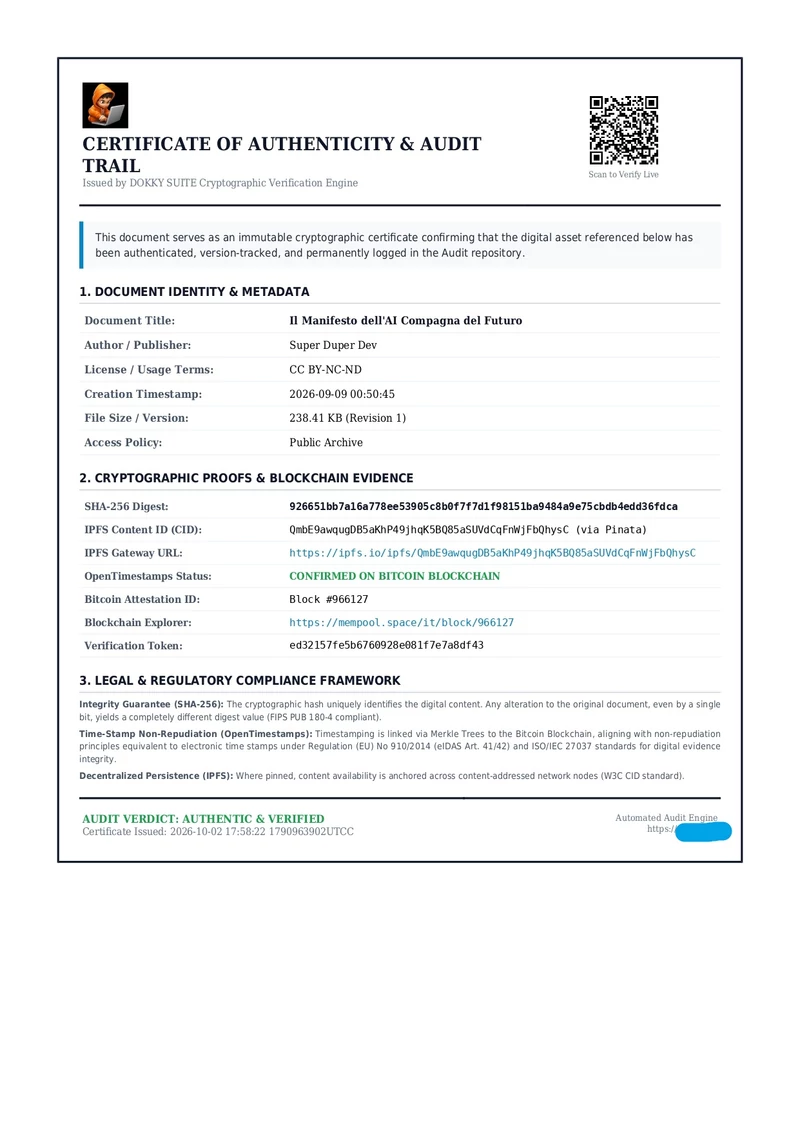
The verification screen also provides an Audit Certificate (PDF) option. This generates a portable report containing the document’s verification details and cryptographic audit information.
The certificate is useful when the verification must be retained outside the platform: for internal compliance records, client delivery, publication archives, legal documentation, intellectual-property workflows, or third-party review. Rather than relying on a transient browser screen, the verifier can preserve a formal report of what was checked and what the system confirmed at that time.
Verification Without Trusting a Single Party
The purpose of this system is not merely to say, “Dokky says this PDF is valid.” The goal is to give every party a practical way to check the evidence.
A QR code or token leads to the document record. Uploading the local PDF tests whether the file itself matches the original SHA-256 fingerprint. The IPFS CID, when enabled, links the document to decentralized content addressing. OpenTimestamps, when stamped, allows the file’s existence to be checked against Bitcoin’s blockchain history.
In other words, Dokky Publisher does not stop at generating a polished PDF/A-3b document. It gives that document a verifiable lifecycle: from draft and version creation, to publication, distribution, independent integrity testing, and long-term timestamp evidence. Does not claim to replace a qualified electronic signature or a qualified eIDAS timestamp. It provides independently checkable technical evidence of document integrity and prior existence, which may support an evidentiary record depending on the applicable jurisdiction and case.
A PDF can be read by anyone.
With Dokky verification, it can also be checked!


Replies on this Post
No comments yet. Be the first to reply!